
.png?width=300&height=175&name=Elexant%203500i%20FAQ%202%20(1).png) We continue our blog series on frequently asked questions for the Raychem Elexant 3500i electronic thermostat. Below we break down the most frequently asked questions around operation and maintenance for the 3500i:
We continue our blog series on frequently asked questions for the Raychem Elexant 3500i electronic thermostat. Below we break down the most frequently asked questions around operation and maintenance for the 3500i:
Operation & Maintenance
How is the temperature set and adjusted on the thermostat?
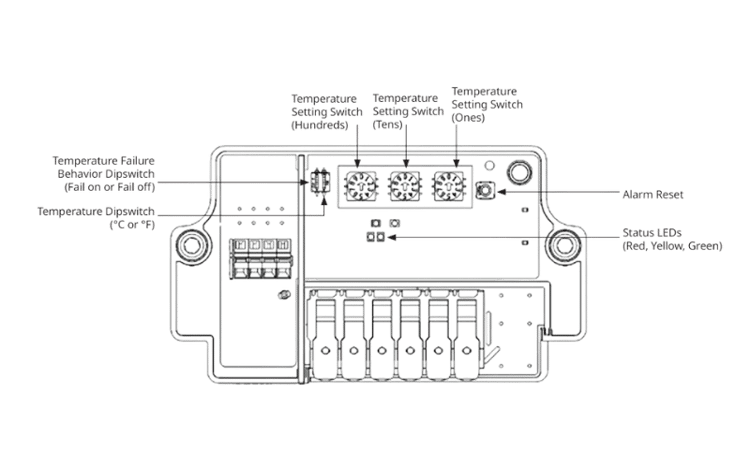
The setpoint is set via 3 rotary dials on the Standard and Alarm variant of the Elexant 3500i, and via the Elexant Connect application for the Communicating, Current Sensing, and Ground Fault Detecting variants of the Elexant 3500i. Please refer to the Elexant 3500i Installation Manual for more information on programming the Standard and Alarm variant, and the Elexant Connect Operations Manual for the Communicating, Current Sensing, and Ground Fault Detecting variants.
Given the Standard and Alarm variants of the 3500i are not Bluetooth enabled, they can still be programmed (changes made to temperature settings) by using the digital switches and rotary dial located on the electronics module.
Does the thermostat have a local display? Is remote monitoring possible?
Are there any built-in diagnostic or alarm features?
The Elexant 3500i is capable of multiple diagnostic and alarm features such as an auto-test that is performed every 24 hours, as well as temperature, current, and ground fault alarms. Many of these features are only available on specific variants of the Elexant 3500i, so please refer to the Elexant 3500i Installation Manual for a complete list of features and alarms. The auto-test is fixed to 24 hours or off, it cannot be changed to occur more often or less than 24 hours.
Are replacement parts readily available?
Yes, replacement modules, replacement enclosures, and accessories for the Elexant 3500i are available now. For a complete list, please refer to the Elexant 3500i datasheet.
Are there 2 RTD inputs or one on the 3500i?
This is dependent on the 3500i variant, the Standard, Alarming and Communicating variants only have 1 RTD terminal. The Current Sensing and Ground Fault Detecting variants have two RTD terminals.
Can breather slash drain be added to the controller?
No, there is no breather drain added to it. However, on the junction box stand, there is a little hole directly underneath that acts like a breather drain on the pipe mount version of the 3500i.
Can isometric drawings be included into the heat trace circuits within the monitoring app?
Elexant Connect App is only a point-to-point application, meaning it’s only for a tablet or a mobile device. There is no storage inside the 3500i, if we were to store heat trace ISOS, we would need to store that either locally in the 3500i or something similar, so if any other device were to connect to it, they could pull that. Currently, isometric drawings are NOT included.
Is there any way to connect the 3500i to 480 or 600v 3phase systems?
No, the Elexant 3500i is rated from 100 Vac to 277Vac systems.
How can the modbus address be set without the tablet?
The Modbus address can be set via Elexant Connect (via BlueTooth) or via Modbus command to the appropriate register (via RS-485).
What is the default modbus address?
The default modbus address is 1.
Where can one access the default settings list for all 3500i parameters “Out of box”?
All default settings can be seen on the Elexant 3500i Modbus Map.
Can the 3500i drive contactors?
Are the individual terminal blocks replaceable (RTD, COMM) or if a terminal block is damaged does the whole internal module need to be replaced?
The terminal blocks are not replaceable. If the terminals are damaged, then the module will need to be replaced.
What is the best way to utilize the Elexant 3500i's in ambient sensing freeze protection applications?
The Communicating, Current-Sensing, and Ground Fault Detecting variants can be used in ambient sensing freeze protection applications. It is important that during commissioning, the low temperature alarm should be disabled for all ambient sensing applications. If the low temperature alarm is not disabled, the Elexant 3500i will display a flashing yellow light in the status LED whenever the ambient sensor measures cold temperatures.
The Standard and Alarm variant of the Elexant 3500i will display a low temperature alarm when either of the temperature sensors measure a temperature 3°C (5°F) below the setpoint temperature. This low temperature alarm cannot be disabled in the Standard and Alarm variants, so consider using a line sensed installation rather than an ambient sensed installation when using the Standard and Alarm variants of the Elexant 3500i.
Connectivity
Where can I find the application for Bluetooth communication?
The Elexant Connect app is available on the Google Play Store & Apple App Store.
What is the Bluetooth range for the 3500i?
Bluetooth is generally listed as less than 100 meters under ideal conditions.
The maximum distance will be less in cluttered industrial environments or with older Bluetooth devices, but you can expect 40 meter (~130’) Bluetooth range to communicate to the Elexant 3500i.
If you have multiple thermostats in the same area. How does Bluetooth identify specific units?
Once you connect your devices via the Elexant Connect App, and you go to Search for Devices, it automatically is going to sort any device that it finds within range based off the signal strength so that the strongest signal shows on top, which in theory is going to be the device that's closest to you. If you have multiple devices and you aren't sure which one you're talking about, if you select a device, it gives you two options. The first one is to connect and you're able to program, monitor and take whatever action you intend to. The second option is via a Find Me feature. The local indicator light on the 3500 will rapidly flash between red, yellow and green when you are trying to locate the 3500i via this feature.
You can quickly tell even at a far distance exactly which thermostat you are trying to connect to via the Elexant Connect. Once you're connected to it, you can name each one of these thermostats to be a unique name. You can call this whatever you want – by circuit breaker name, line number, unique identifier etc. Anytime you connect to it in the future, that's what it will show up as if any other person is connecting using Elexant Connect.
Does the 3500i light do anything when you connect it to Bluetooth?
Yes, it does. In Elexant Connect, the app lists all the paired devices in an area, it will automatically sort based off signal strength. When you select a device, it gives you two options. The first one is to connect directly to it, and the other is to use what's called a “Find Me” feature. After selecting “Find Me,” the local indication light will cycle between red, yellow and green several times. So you can easily see which device you’re looking at to make sure you're connecting to the right one.
Do the dip switch settings override the tablet or vice versa?
Below is a snapshot of the Standard Version of the Elexant 3500i. As you can see, this version has dipswitches and rotary dials to configure the device.
Compare this to the Communicating Version of the Elexant 3500i (shown below as well under the first image), which doesn't have any dipswitches or rotary dials for configuration. The standard and alarm versions of the Elexant 3500i use dip switches and rotary dials for configuration as they do not possess the ability to communicate to another device. The communicating, current sensing, and ground fault detecting versions of the Elexant 3500i don't have any dip switches or rotary dials since the device is configured via Bluetooth connection to the Elexant Connect application, or via Modbus connection via the RS-485 terminals.
.png?width=500&height=313&name=Resource%20Cover%20Horizontal%20(1).png)
Learn more about the Elexant 3500i family of electronic thermostats here.